
Promotion Rule: Coupon
Navigate to edit Promotion Rule and select type Coupon from Rule type dropdown.
With Coupon promotion rule, configure what you plan to discount in currency or points. If currency amount is specified, you need to select the Currency.
You can configure one or more promotion rules with different currencies, allow your customers to choose which currency they want to pay in.
Select Condition section to edit rule conditions.
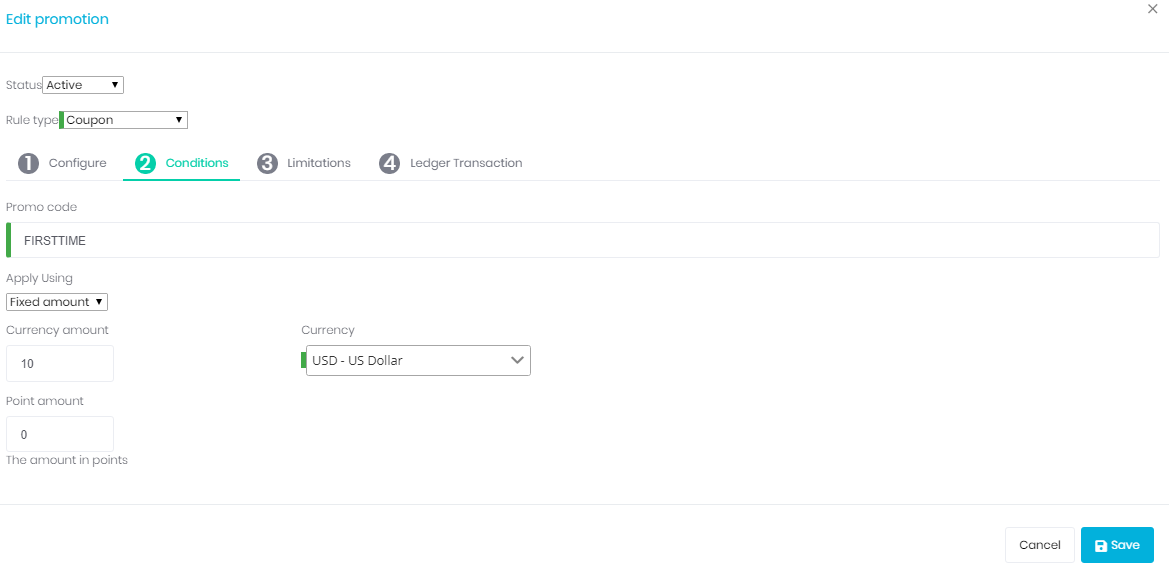
Promo Code
Enter unique promotion code that can be applied to the order with a valid coupon code.
Coupon Types
You can set up two types of coupons in Promotion Rule:
- Fixed Amount Coupons
- Percentage Coupons
Fixed Amount
This discount type will deduct the specified amount from the total amount of the line item if this promotion rule is associated with the product. If this promotion rule has no association with a product, the amount will be deducted from the invoice.
Percentage
This discount type will deduct the specified percentage amount from the total amount of the line item if this promotion rule is associated with the product. If this promotion rule has no association with a product, the percentage will be deducted from the invoice.
Pricing Options
Currency Amount
The currency amount of the rule in given Currency.
Currency
Choose the currency that the rule will be billed in. If you do not see the desired currency listed, you may need to add the new currency.
Note: You can only have one currency defined for each promotion rule. If you wish to support multiple currencies for a product, you must create separate promotion rule for each currency.
Point Amount
The amount in points for the rule. You may choose not use currency, but point system. For example, Omnibasis is using points for our billing.